
Martin Kelly is the founder of Botonomy AI and the kind of person who builds agent loops at midnight, breaks them by 12:15, and has opinions about why yours broke too.
I built my first AI agent loop in 2023 with 47 lines of Python. It called a search API, hallucinated a tool name that didn’t exist, then tried to call itself recursively until my OpenAI bill hit $14 in six minutes. That failure taught me more about agent architecture than any tutorial. Three years and a few hundred agent builds later, I can tell you exactly what works, what doesn’t, and where the tutorials lie to you.
This guide walks through building an AI agent from scratch with Python — raw code first, frameworks second. No hand-waving. No “just use LangChain” without explaining what LangChain replaces.
TL;DR — How to Build an AI Agent From Scratch:
- Define the goal — Pick one task and the tools the agent can use
- Choose an LLM — GPT-6.1 Sol, Claude Sonnet 5.5, or Gemini 3.1 Pro as the reasoning engine
- Build the agent loop — A while loop that reasons, picks a tool, executes, and feeds results back
- Add memory — Conversation buffer for short-term, vector store for long-term recall
- Integrate tools — Function calling, REST APIs, or MCP servers
- Test ruthlessly — Edge cases, cost caps, hallucinated tool calls
- Deploy with guardrails — Observability, rate limits, human-in-the-loop checkpoints
In short
Building an AI agent from scratch means writing a loop where an LLM reasons about a task, selects a tool, executes it, observes the result, and repeats until done. In Python this takes roughly 20 lines using OpenAI function calling, a messages list for short-term memory, and a hard iteration cap to prevent runaway costs. Before reaching for a framework like LangChain or CrewAI, add a vector store, validated tool allowlists, and cost guardrails.
What Is an AI Agent? Core Definition and Anatomy
Most people confuse chatbots with agents. A chatbot answers questions. An agent makes decisions, uses tools, and maintains state across interactions.
An AI agent is an autonomous system that follows a Perceive → Reason → Act loop. The ReAct pattern (Yao et al., 2023) formalized this: the model reasons about what to do, takes an action (calls a tool), observes the result, then reasons again. It loops until the task is done or a stop condition triggers.
Andrew Ng’s 2025 agentic AI framework breaks this further into four design patterns: reflection, tool use, planning, and multi-agent collaboration. Anthropic’s research on tool use pushed the field forward by demonstrating that models can reliably select and parameterize tools when given structured schemas.
If you’re evaluating which best ai agent framework fits your use case, understanding these patterns matters more than picking a library.
The 7 types of AI agents:
- Simple reflex — Acts on current input only, no memory
- Model-based reflex — Maintains an internal model of the world
- Goal-based — Plans actions toward a defined objective
- Utility-based — Optimizes for a utility function, not just goal completion
- Learning — Improves performance from experience
- Hierarchical — Decomposes tasks across layers of sub-agents
- Multi-agent — Multiple agents collaborating or competing on a shared task
Core Architecture Components of an AI Agent in 2026
Every production agent I’ve built shares five components. Skip one and you’ll spend your weekends debugging.
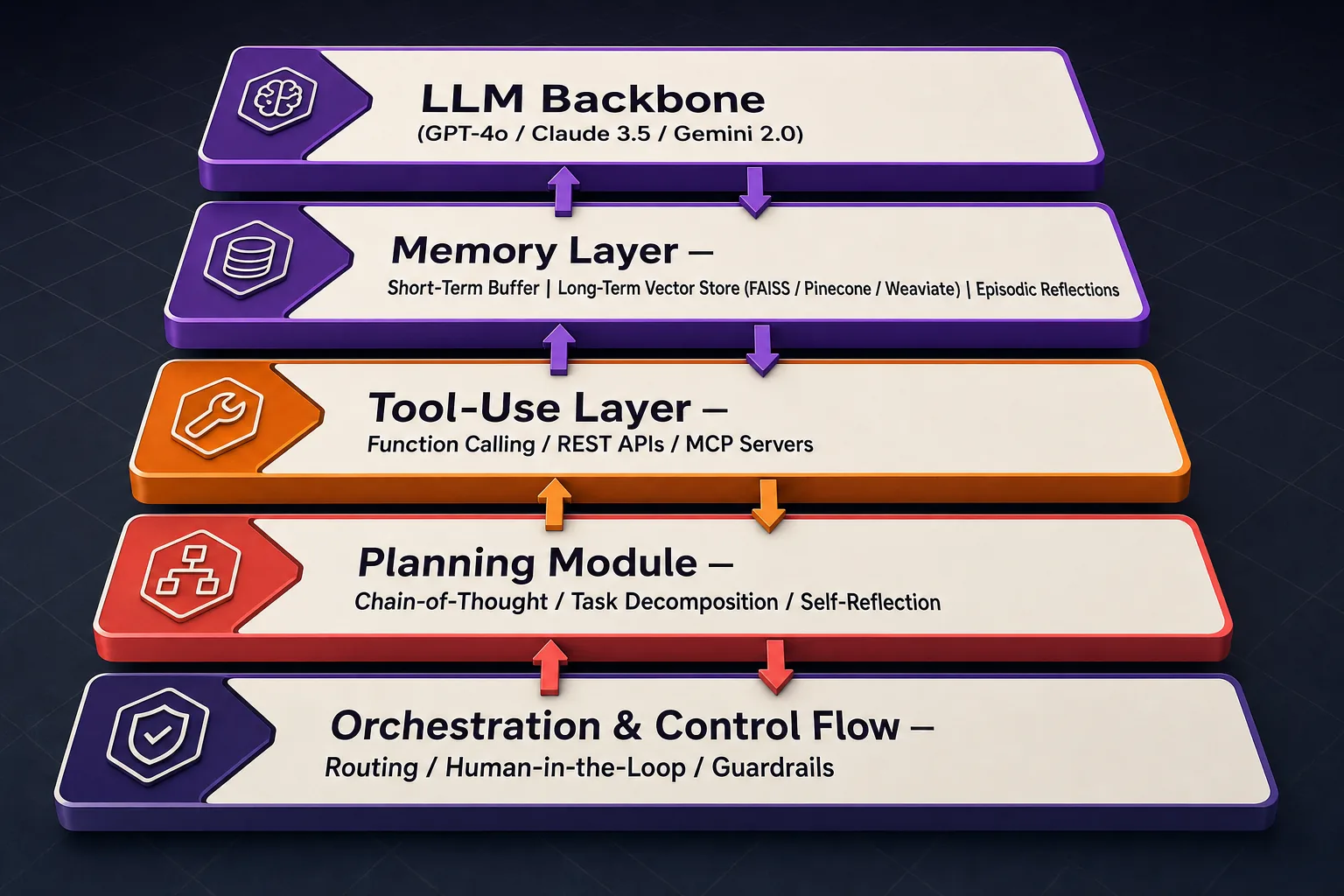
LLM Backbone
The reasoning engine. GPT-6.1 Sol, Claude Sonnet 5.5, and Gemini 3.1 Pro all support function calling — the bridge between “the model thinks it should search the web” and “the model actually calls your search function.” Function calling turns natural language intent into structured JSON that your code can execute. Without it, you’re parsing free-text tool invocations with regex. I’ve done that. Don’t.
Memory Layer
Three tiers. Short-term memory: a conversation buffer holding the last N messages. Long-term memory: a vector store — FAISS (free, local), Pinecone (managed, $0–$70/mo), or Weaviate (open source). Episodic memory: stored reflections the agent can reference later. If your agent forgets what it did two steps ago, your memory layer is broken. This connects directly to RAG and knowledge systems — the vector store is doing retrieval-augmented generation whether you call it that or not.
Tool-Use Layer
Function calling through the OpenAI or Anthropic APIs. REST APIs for external services. MCP (Model Context Protocol) servers for standardized tool integration — MCP is gaining traction in 2026 because it lets you plug tools into any compatible model without rewriting schemas.
Planning Module
Chain-of-thought prompting forces the model to reason before acting. Task decomposition breaks complex goals into subtasks. Self-reflection loops let the agent evaluate its own output and retry. Without planning, the agent just guesses.
Orchestration and Control Flow
Deterministic routing logic decides which path the agent takes. Human-in-the-loop checkpoints pause execution for approval on high-stakes actions. Guardrails prevent the agent from doing something expensive or dangerous.
[Image: AI agent architecture diagram showing LLM backbone, memory store, tool-use layer, planning module, and orchestration flow]
Step-by-Step: Building an AI Agent From Scratch With Python
Enough theory. Here’s how to build an AI agent with ChatGPT’s API — raw Python first, then framework overlay.
Step 1: Define Goal and Tools
Pick one task. “Search the web and summarize results” is a good starter. Define available tools as JSON schemas that the OpenAI function calling format expects.
Step 2: Build the Agent Loop
This is the core. 20 lines of Python:
import openai
import json

# Define a simple tool
tools = [{"type": "function", "function": {
    "name": "search_web", "description": "Search the web for a query",
    "parameters": {"type": "object", "properties": {
        "query": {"type": "string"}}, "required": ["query"]}}}]

messages = [{"role": "system", "content": "You are a research agent. Use tools to answer questions."}]
messages.append({"role": "user", "content": "What is the current price of Bitcoin?"})

for i in range(5):  # max 5 iterations — never loop forever
    response = openai.chat.completions.create(
        model="gpt-6-luna", reasoning_effort="none", messages=messages, tools=tools)
    msg = response.choices[0].message
    messages.append(msg)  # append assistant response to memory

    if msg.tool_calls:  # model wants to use a tool
        for call in msg.tool_calls:
            result = execute_tool(call.function.name, json.loads(call.function.arguments))  # you implement this
            messages.append({"role": "tool", "tool_call_id": call.id, "content": str(result)})
    else:
        print(msg.content)  # no tool call = final answer
        break
That for i in range(5) is doing more work than it looks. Without it, a confused model will loop until your credit card weeps.
Step 3: Add Memory
The messages list above is already short-term memory. For long-term recall, embed completed conversations into a vector store and retrieve relevant context before each new session:
# After task completion, store the interaction
embedding = openai.embeddings.create(model="text-embedding-3-small", input=str(messages))
vector_store.upsert(id=session_id, vector=embedding.data[0].embedding, metadata={"messages": messages})
Step 4: Refactor Into LangChain/LangGraph
When building AI agents with LangChain, the framework replaces your manual loop with a graph of nodes and edges. Each node is a step (call LLM, execute tool, check guardrail). LangGraph handles state transitions. The tradeoff: you gain observability via LangSmith, but you lose transparency into what each line is doing. I always build raw first, then port to a framework once the logic is proven.
Step 5: Add Guardrails
MAX_ITERATIONS = 10       # hard stop after 10 loops
MAX_COST_PER_SESSION = 0.50  # $0.50 cap per session
# Validate tool names before execution
ALLOWED_TOOLS = {"search_web", "calculator", "db_query"}
if call.function.name not in ALLOWED_TOOLS:
    raise ValueError(f"Hallucinated tool: {call.function.name}")  # reject it
This is where agents become production-ready. A working loop is a demo. A loop with guardrails is a product. For a real-world application, I’ve seen agents like this power ai marketing automation workflows — taking research tasks from “manual and slow” to “done before the coffee’s cold.”
AI Agent Framework Comparison: LangChain vs AutoGPT vs CrewAI vs OpenAI Agents SDK
Picking a framework before understanding the tradeoffs is how you end up rewriting everything in month two.
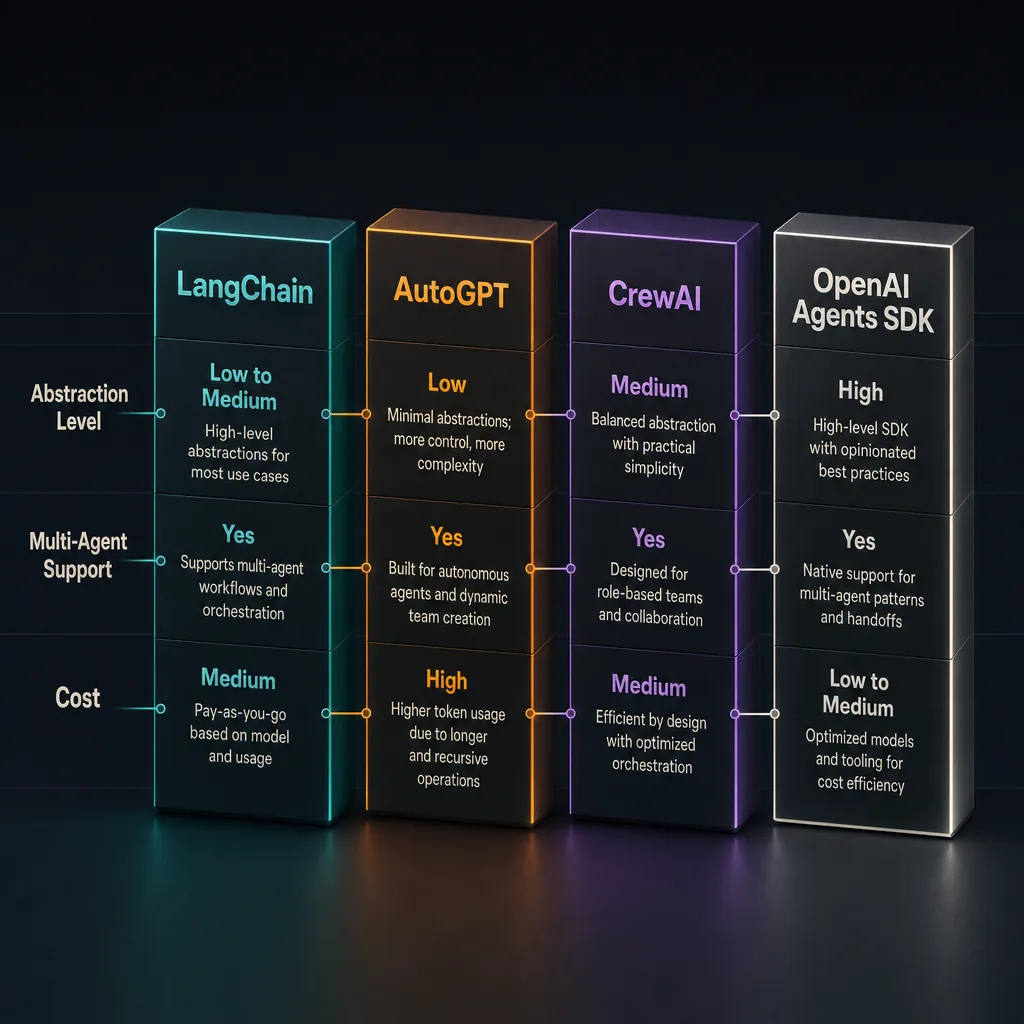
| Framework | Architecture | Memory | Tool Integration | Multi-Agent | Production Readiness (2026) | Best For |
|---|---|---|---|---|---|---|
| LangChain / LangGraph | Graph-based orchestration | Full (buffer, vector, episodic) | Function calling, MCP, custom | Yes (LangGraph) | High | Production custom agents |
| AutoGPT | Autonomous goal loops | Long-term (file/vector) | Plugin-based | Limited | Medium | Experimentation, research |
| CrewAI | Role-based multi-agent | Shared memory across agents | Tool delegation | Yes (core feature) | Medium-High | Team-of-agents workflows |
| OpenAI Agents SDK | Native function calling | Conversation buffer | Built-in function calling | Basic | High | Single-agent ChatGPT builds |
LangChain/LangGraph is the most mature option for production. LangSmith gives you trace-level observability — you can see every LLM call, tool invocation, and token cost. The learning curve is steep. Expect 2–3 weeks before you’re productive.
AutoGPT pioneered autonomous goal-driven agents. High autonomy, but that autonomy is the problem — it makes unpredictable decisions and burns tokens doing it. Great for demos. Painful for production.
CrewAI shines when you need multiple agents with defined roles (researcher, writer, editor) collaborating on a task. The role abstraction maps well to team workflows but adds overhead for single-agent use cases.
OpenAI Agents SDK is the simplest path if you’re building a single agent with ChatGPT’s API. Minimal abstraction, native function calling, fast to prototype. It falls short when you need multi-agent orchestration or complex memory. For a production example of what a specialized agent looks like when deployed, see our AI SEO agent.
No-code option: If Python isn’t your thing, Make.com and Flowise let you build AI agents without code. They’re real tools — not toys — but they cap out when you need custom logic or fine-grained control.
How Much Does It Cost to Build an AI Agent in 2026?
The honest answer: somewhere between $0 and $50,000. The range is that wide because “AI agent” covers everything from a 50-line script to an enterprise multi-agent platform.
LLM API costs (list prices, October 2026):
– GPT-6.1 Sol: $2 / $10 per 1M tokens (input/output)
– Claude Sonnet 5.5: $2 / $10 per 1M tokens
– Gemini 3.1 Pro (preview): $2 / $12 per 1M tokens (prompts up to 200K tokens)
Infrastructure:
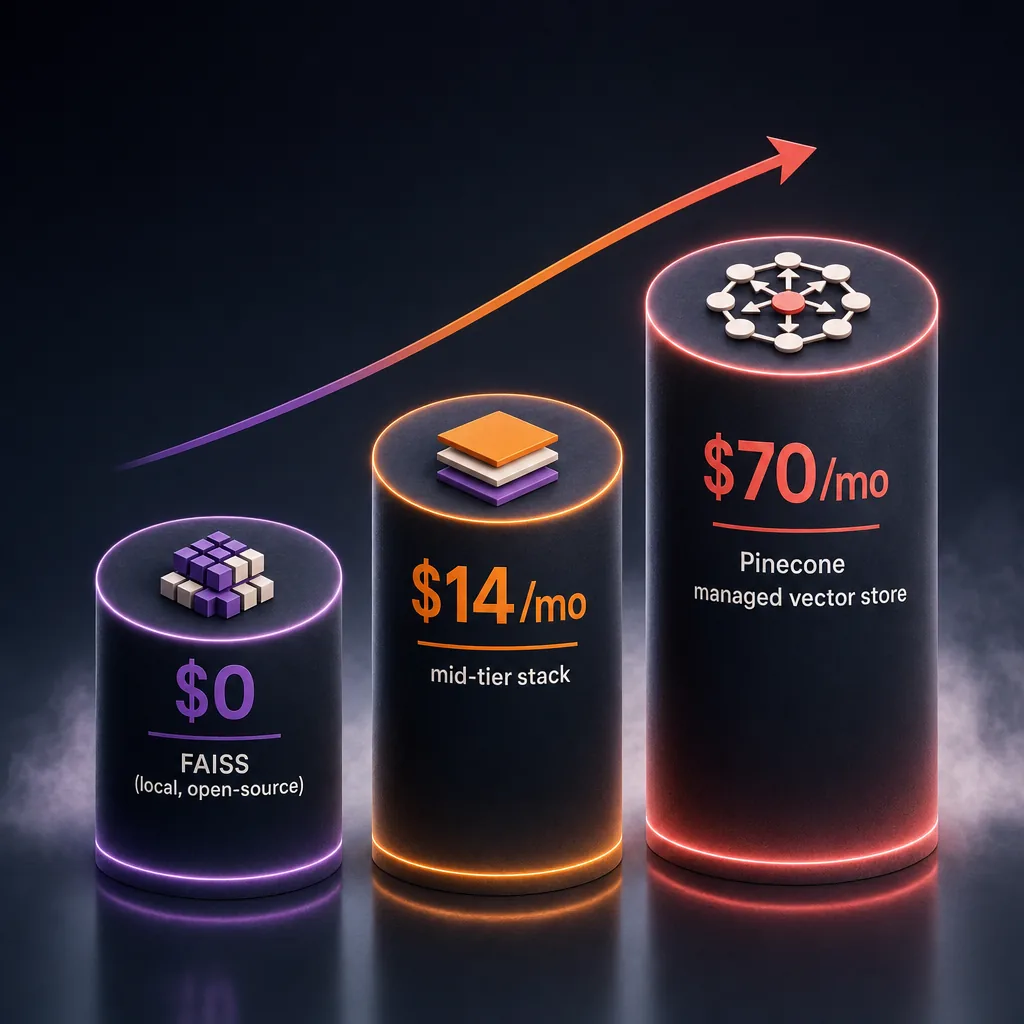
– Vector database: $0 (FAISS local) to $70/mo (Pinecone starter)
– Compute: $5–$50/mo for a simple orchestration server
Total cost tiers:
– DIY simple agent: $0–$50/month
– Production multi-agent system: $200–$2,000/month
– Enterprise/agency build: $5,000–$50,000+ (complexity, integrations, compliance)
Cost controls matter more than cost estimates. Model routing, sending simple tasks to GPT-6 Luna ($0.10 / $0.50 per 1M tokens) and complex tasks to GPT-6.1 Sol, cuts API spend by 40–60% in my experience. Caching repeated queries saves another 15–20%.
If you’d rather compare build costs against a managed service, check our transparent pricing.
Common Pitfalls and a Production Checklist for 2026
I’ve watched smart engineers ship agents that work in a notebook and explode in production. Same five problems, every time.
Pitfall 1: Infinite loops. The agent gets stuck reasoning in circles. Fix: hard max_iterations limit. I use 10 for simple agents, 25 for complex multi-step tasks. Always include a timeout.
Pitfall 2: Hallucinated tool calls. The model invents a tool name that doesn’t exist, then your code throws a KeyError at 3am. Fix: validate every tool name and argument against an allowlist before execution.
Pitfall 3: Context window overflow. Long conversations blow past the model’s context limit. Fix: implement sliding window memory or auto-summarization. GPT-6.1 Sol handles 1.05M tokens. Claude Sonnet 5.5 handles 1M. You’ll still hit the limit on complex tasks.
Pitfall 4: Cost runaway. A recursive agent loop can burn $50 in minutes. Fix: per-session and daily spend caps. Monitor via OpenAI’s usage dashboard or LangSmith.
Pitfall 5: Prompt injection. Users craft inputs that override system instructions. Fix: sanitize inputs, use system-level guardrails, separate user content from system prompts.
Production Checklist
- ✅ Observability — LangSmith or Weights & Biases for trace-level logging
- ✅ Rate limiting — per-user and per-session caps
- ✅ Fallback strategies — graceful degradation when tools fail
- ✅ Prompt injection defense — input sanitization, system prompt isolation
- ✅ Cost controls — per-session budgets, model routing
- ✅ Human-in-the-loop — escalation paths for high-stakes decisions
- ✅ Audit trails — log every tool call, every LLM response, every decision
Follow the Agent Development Lifecycle: Build → Test → Deploy → Monitor → Iterate → Govern. Skip “Monitor” and you won’t know your agent is broken until a client tells you.
FAQ: Building AI Agents From Scratch
What are the 7 types of AI agents?
- Simple reflex — Responds to current percepts with predefined rules
- Model-based reflex — Maintains an internal state model to handle partial observability
- Goal-based — Selects actions that achieve a specific goal
- Utility-based — Chooses actions that maximize a utility function
- Learning — Improves its behavior based on past experience
- Hierarchical — Decomposes goals across multiple layers of sub-agents
- Multi-agent — Coordinates with other agents to complete shared tasks
Are AI agents easy to build?
A simple agent? Yes — 50 lines of Python and an API key. A production agent with memory, guardrails, observability, and multi-tool orchestration? No. That takes weeks of engineering and ongoing maintenance. For proof that it’s possible, see our AI content agent — it works, but it didn’t ship overnight.
What is the easiest tool to build AI agents?
For code-first builders: OpenAI Agents SDK. Minimal abstraction, fast to prototype. For no-code: Make.com or Flowise. Both let you wire up agent logic visually without writing Python.
Do I need a framework to build an AI agent?
No. Start with raw API calls. A while loop, the OpenAI function calling API, and a messages list is a complete agent. Use a framework like LangChain or CrewAI when you need managed memory, multi-agent orchestration, or observability at scale. Frameworks solve real problems — but only problems you actually have.
Build It, Break It, Ship It
Building an AI agent from scratch is absolutely achievable. The loop is simple: reason, act, observe, repeat. The hard part isn’t the loop — it’s everything around it: memory that doesn’t overflow, guardrails that prevent $200 surprises, observability that tells you why the agent did what it did.
- Start with raw Python and the OpenAI API before reaching for frameworks
- Set cost caps and iteration limits from day one — not after the first incident
- Production means observability, fallback strategies, and human escalation paths
If you’d rather skip the build phase and deploy production-ready AI agents for SEO, content, and paid ads today, see how Botonomy AI marketing automation works — or contact us to talk architecture.