
Martin Kelly is the founder of Botonomy AI and the kind of builder who’s wired LangChain pipelines at 2 a.m. just to rip them out and rewire them in LangGraph by morning — because the agent demanded it.
Most developers building AI agents in 2026 start with LangChain. Many hit a wall within weeks. The wall isn’t LangChain’s fault — it’s an abstraction mismatch. You picked a tool designed for sequential pipelines and tried to build a system that needs to loop, branch, and recover from errors mid-execution.
That’s the core tension between LangChain and LangGraph. They’re not competitors. They’re different tools for different problems, built by the same team. After shipping dozens of production agent systems at Botonomy, I can tell you: the difference between LangChain and LangGraph isn’t academic. It determines whether your agent works in a demo or works in the real world.
In short
LangChain and LangGraph are both built by LangChain Inc. but serve different purposes: LangChain is a pipeline framework for sequential, linear workflows like RAG and chatbots, while LangGraph is a graph-based library built on top of LangChain for stateful, multi-step agents that need to loop, branch, and recover from errors. They work together in production systems, with LangGraph nodes calling LangChain components directly.
What Are LangChain and LangGraph Used For?
Picking the wrong framework costs engineering weeks. Understanding what each tool actually does — and doesn’t do — prevents that.
LangChain is a framework for building LLM-powered applications using composable chains and integrations. Think of it as a pipeline builder. You connect prompts, retrievers, tools, and memory modules into sequential chains. Data flows in one direction: input → processing steps → output. LangChain’s strength is its massive integration ecosystem — hundreds of LLM providers, vector stores, and tools snap together through a standardized interface. For RAG pipelines, simple chatbots, and prompt chaining, LangChain is the fastest path from idea to working prototype.
LangGraph is a library built on top of LangChain for constructing stateful, multi-actor agent workflows using graph-based control flow. Instead of chains, you define nodes (functions) and edges (transitions) that form a directed graph. Nodes can loop back. Edges can be conditional. State persists across steps. This architecture supports cycles, parallel execution, human-in-the-loop approvals, and error recovery — patterns that sequential chains simply can’t express.
The relationship matters: LangGraph extends LangChain. It doesn’t replace it. Both are maintained by LangChain Inc. They share the same ecosystem, the same integrations, and the same community. LangGraph imports LangChain components directly.
As agentic AI matures in 2026, understanding which tool fits which problem isn’t a nice-to-have. If you’re evaluating the best ai agent framework for your stack, the LangChain-versus-LangGraph decision is the first fork in the road.
How Does LangChain Work vs How LangGraph Works?
The architectural difference between these two tools is the difference between a conveyor belt and a decision tree.
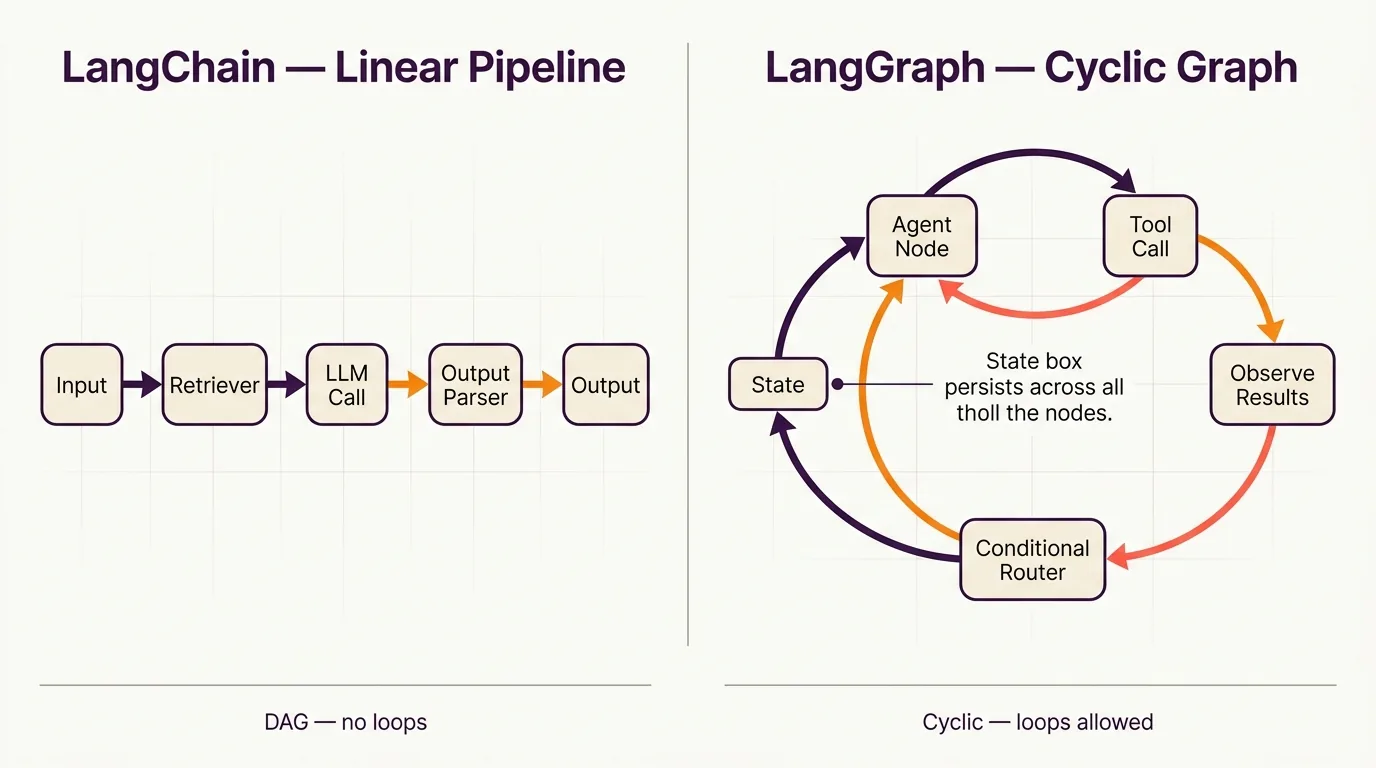
LangChain’s architecture centers on LangChain Expression Language (LCEL) — a declarative way to compose chains. You build pipelines from prompt templates, retrievers, LLM calls, output parsers, and tool integrations. Data flows linearly through the pipeline. Memory modules can inject context, but the control flow itself is sequential. It follows a DAG-like structure: directed, acyclic, no loops. This makes LangChain predictable, debuggable, and fast to prototype with. It’s ideal for RAG and knowledge systems where you retrieve documents, stuff them into a prompt, and generate a response.
LangGraph’s architecture uses a cyclic graph. You define nodes as Python functions, connect them with edges, and add conditional routing logic. The graph can loop — a node’s output can route back to a previous node based on state. State is a first-class citizen: a typed dictionary that persists across the entire graph execution. LangGraph also supports checkpointing, which means you can pause a workflow, store its state, and resume it later.
Harrison Chase, CEO of LangChain Inc., has stated that LangGraph was built precisely because chains couldn’t handle the control flow complexity of real-world agents. In his words, agents need to “decide what to do, observe results, and decide again” — a fundamentally cyclic process that a linear chain can’t represent. LangGraph’s official documentation details this graph-based execution model extensively.
The practical implication: if your agent needs to retry a failed tool call, ask a human for approval mid-workflow, or run multiple reasoning paths in parallel, LangGraph handles it natively. LangChain doesn’t.
LangChain vs LangGraph: Which Is Better in 2026?
Neither is universally better. The right answer depends entirely on what you’re building.
Comparison Table
| Feature | LangChain | LangGraph |
|---|---|---|
| Architecture | Sequential composable chains | Directed cyclic graph |
| Control Flow | Linear, DAG-like | Conditional, cyclic, branching |
| State Management | Limited memory modules | Built-in persistent state |
| Human-in-the-Loop | Not native | Native support |
| Error Recovery | Manual retry logic | Built-in loop-back patterns |
| Learning Curve | Lower, faster onboarding | Higher, requires graph thinking |
| Checkpointing | Not available | Built-in state persistence |
| Ideal Use Case | RAG, chatbots, prompt chains | Multi-step agents, approval workflows |
Choose LangChain when you need a RAG pipeline, a simple chatbot, prompt chaining for content generation, or rapid prototyping. If your data flows in one direction and you don’t need branching logic, LangChain is simpler and faster.
Choose LangGraph when you’re building multi-step agents that make decisions, workflows requiring human approval gates, parallel tool execution, or systems that need to recover from errors and retry. LangGraph’s checkpointing and state persistence are a 2026 differentiator for production-grade agent systems — you can serialize an agent’s state to a database and resume execution after a server restart.
So, langchain vs langgraph which is better? It’s the wrong question. The right question is: does your workflow need cycles? If yes, LangGraph. If no, LangChain. If you’re unsure, start with LangChain and migrate to LangGraph when you hit the wall.
LangGraph vs CrewAI and the Broader Agent Framework Landscape
LangGraph isn’t the only agent orchestration tool in 2026. But it occupies a specific niche that matters.
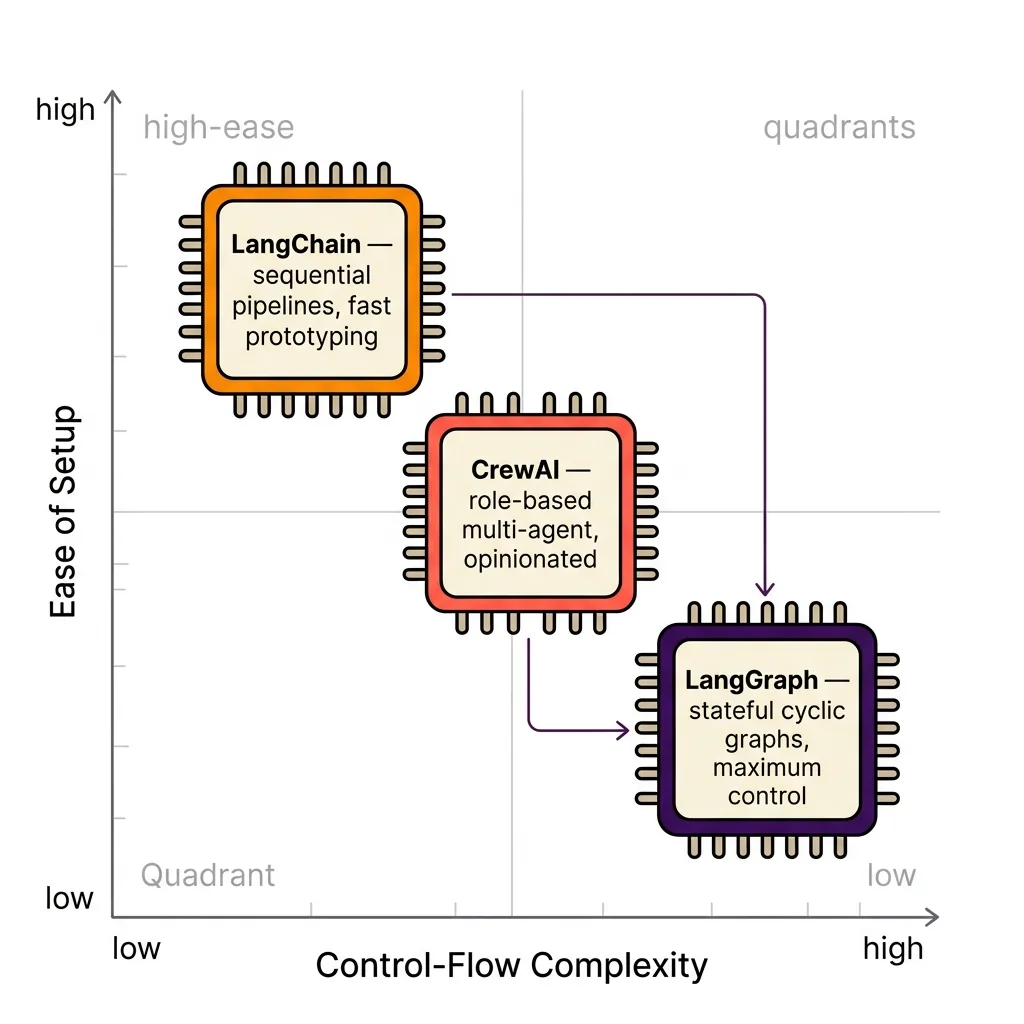
LangGraph vs CrewAI: CrewAI abstracts multi-agent orchestration with role-based agents — you define agents with roles, goals, and backstories, then let them collaborate. It’s higher-level and faster to set up for multi-agent scenarios. LangGraph operates at a lower level, giving you explicit control over every node transition, state mutation, and conditional branch. If you want to define exactly how agents interact, LangGraph wins. If you want to define what agents should accomplish and let the framework handle orchestration, CrewAI is simpler.
Other 2026 alternatives include Microsoft’s AutoGen for multi-agent conversations, Semantic Kernel for enterprise .NET/Python integration, and custom frameworks built directly on LLM APIs. LangGraph’s advantage over all of these: fine-grained control over agent state and transitions without sacrificing access to LangChain’s integration ecosystem.
What about LangSmith? This is a common confusion. LangSmith is not a framework — it’s the observability and tracing layer built by LangChain Inc. It monitors, debugs, and evaluates what LangChain and LangGraph build. Think of it as the logging dashboard, not the engine. All three — LangChain, LangGraph, and LangSmith — are distinct products from the same company, each serving a different purpose.
For context on community adoption: LangChain’s GitHub repository has over 100k stars, making it one of the most popular open-source AI projects. LangGraph, while newer, has grown rapidly as teams move from prototypes to production agents. Developers exploring ai marketing automation use cases increasingly reach for LangGraph when their workflows demand conditional logic.
Can You Use LangChain and LangGraph Together? (With Examples)
Yes — and in most production systems, you should.
LangGraph is designed to work with LangChain components. Every LangGraph node can call LangChain chains, retrievers, tools, and LLMs. The integration isn’t bolted on; it’s the design intent.
Example 1: Customer Support Agent
A customer support agent uses a LangChain retriever to search a knowledge base inside a LangGraph node. The graph routes the response through a quality-check node. If the answer confidence is below a threshold, a conditional edge routes to a human escalation node. If the human approves, the graph continues to the response delivery node. This loop — retrieve, check, escalate, approve — is impossible in a linear chain.
Example 2: SEO Content Pipeline
At Botonomy, we’ve built content pipelines where LangChain handles the core prompt chaining: keyword research → outline generation → draft writing. LangGraph wraps that chain in a multi-step review workflow. One node runs a factual accuracy check. Another routes to a human editor for approval. If the editor rejects, the graph loops back to the draft node with revision instructions. The AI content agent we ship uses this exact architecture pattern.
Practical tip: start with LangChain for the core LLM logic. Build your retriever, your prompt templates, your tool integrations. Then wrap that logic in a LangGraph graph when you need branching, loops, or persistent state. Don’t start with LangGraph if you don’t need it — you’ll over-engineer.
For those searching for a langchain and langgraph tutorial, the best starting points are LangChain’s official documentation at python.langchain.com and LangGraph’s quickstart guide in its official docs. Both are maintained, current, and include runnable code examples.
Will LangGraph Replace LangChain? Is LangGraph Owned by LangChain?
LangGraph will not replace LangChain. Full stop.
They serve different abstraction levels. LangChain is the foundation — the composable building blocks for LLM applications. LangGraph is the orchestration layer that arranges those blocks into complex, stateful workflows. Removing LangChain would remove the components LangGraph depends on.
LangGraph is owned and maintained by LangChain Inc. Same company, same team, same GitHub organization. Harrison Chase has confirmed this repeatedly in official communications: LangGraph is a sibling project, not a competitor. The LangChain blog explicitly describes LangGraph as “a library for building stateful, multi-actor applications with LLMs, built on top of (and intended to be used with) LangChain.”
The real risk in 2026 isn’t one replacing the other. It’s choosing wrong. Using LangChain alone for a complex agent workflow means you’ll hit control-flow limitations — no native loops, no conditional branching, no persistent checkpoints. Using LangGraph for a simple RAG pipeline means you’ll spend three days building what LangChain could do in three hours.
Match the tool to the problem. Not the other way around.
FAQ: LangChain vs LangGraph
Q: What are LangChain and LangGraph used for?
A: LangChain builds LLM-powered applications with composable chains — prompt templates, retrievers, tools, and memory in sequential pipelines. LangGraph builds stateful, multi-step agent workflows with graph-based control flow, supporting cycles, branching, and human-in-the-loop patterns.
Q: Will LangGraph replace LangChain?
A: No. LangGraph extends LangChain — it uses LangChain components as building blocks. They’re complementary tools from the same company, LangChain Inc.
Q: Is LangGraph owned by LangChain?
A: Yes. Both LangChain and LangGraph are maintained by LangChain Inc., founded by Harrison Chase.
Q: Can I use LangChain and LangGraph together?
A: Yes. LangGraph nodes can call LangChain chains, tools, and retrievers directly. Most production agent systems use both — LangChain for LLM logic, LangGraph for workflow orchestration.
If you’re building an autonomous SEO pipeline, understanding how these tools compose together is the difference between a prototype and a system that runs unsupervised.
Choosing the Right Framework for Your AI Agents in 2026
The difference between LangChain and LangGraph is an abstraction-level decision — and getting it wrong wastes engineering time while limiting what your agents can actually do.
- Use LangChain for simple LLM pipelines, RAG systems, chatbots, and rapid prototyping where data flows linearly.
- Use LangGraph when your agent needs stateful execution, conditional branching, loops, human approval gates, or error recovery.
- Use both together for production-grade systems — LangChain components inside LangGraph workflows give you the best of both.
If you’re building AI agents and don’t want to spend months choosing between frameworks, Botonomy runs production-grade autonomous marketing systems — SEO, content, paid, outbound — all automated end-to-end. See how it works at Botonomy AI marketing automation.
Expert sources cited: Harrison Chase, CEO and co-founder of LangChain Inc. Official LangChain and LangGraph documentation maintained by LangChain Inc.